Spend less time coordinating, researching, and following up.
Give the coordination and follow-through to an assistant that works through email. Arrange meetings, organize groups, and schedule reminder emails. Research scouts keep you informed with scheduled digests, while agenda summaries help you plan ahead.
7-day free trial, no credit card required. Read our Privacy Policy.
Example conversations with fictional sample content.
From: You
To: Meeting participants
CC: Your HelperBat assistant
Subject: Finding a time to meet
You
Could you help coordinate a 30-minute meeting next week? I’ve included the other attendee in this thread.
Your assistant
I can help find a time. Here are a few options based on the connected calendar availability. Please review the details before confirming.
Works with your calendar
Connect Google Calendar or Microsoft Outlook Calendar so HelperBat can use your availability in scheduling and coordinate calendar events.
Google Calendar
Full integration with Google Calendar for availability checks and event creation
Outlook Calendar
Full integration with Microsoft Outlook Calendar for availability checks and event creation
You can connect both calendars simultaneously. HelperBat checks availability across all connected calendars.

Coordinate your calendar. Keep up with your research.
HelperBat combines the power of AI with the simplicity of email to give you a scheduling experience like no other.
Email-Native Scheduling
CC your assistant on a meeting thread. It uses the conversation context and connected calendar availability to help coordinate a time.
Smart Group Polling
Offer a set of candidate times through a shareable poll. Participants indicate what works, and you can confirm a time with the group.
Research scouts
Turn a research brief into a scheduled scout, then review emailed digests and keyword-searchable finding history.
Booking pages
Publish meeting types on a personal page, then let visitors choose a type and book a time.
Sign-up pages
Offer capacity-limited time slots for first-come, first-served sign-ups, with control over selection, visibility and calendar handling.
Reminders and scheduled tasks
Set daily or weekly email agenda summaries, and ask the assistant to schedule one-off future follow-ups or reminders.
Instant Responses
Handle coordination in email when it suits your conversation.
Timezone Smart
Auto-detects timezones from signatures and context.
Calendar Sync
Uses connected calendar availability to help coordinate events.
Video Links
Video meeting links can be included when configured for the meeting.
Smart Follow-ups
Sends polite reminders until meetings are confirmed.
Booking Page
Get a personal booking page for external meetings.
Privacy details
Review the privacy policy for details about how account and email data are handled.
Research Scouts
Set a mission, choose sources and cadence, then receive findings by email.
Keep a research question moving while you get on with the day.
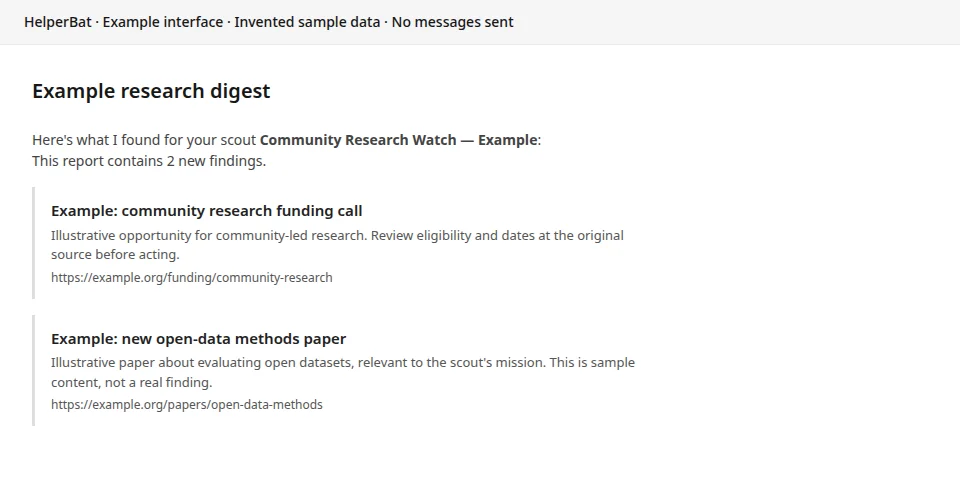
Give a scout a mission, supporting context, sources and a schedule. It checks those sources on the cadence you choose and sends a digest to your inbox, with links to inspect the originals.
- Shape the brief with a clear question and optional reference documents.
- Choose from available web, research, grants, news or RSS sources.
- Review run history and refine the mission as your needs change.

How It Works
Get your personal scheduling assistant in three simple steps.
Name Your Bat
Choose a name like Alfred, Luna, or Max. Your bat gets a unique email address at @helperbat.com that's all yours.
Connect Calendar
Connect Google Calendar or Outlook Calendar and set the meeting preferences available in setup.
CC to Schedule
CC your bat on any email thread. It reads the conversation, proposes times, and handles all the back-and-forth.



Simple, Affordable Pricing
Review the current plan and billing details below before you get started.
Billed annually at $59.88
- 7-day free trial included
- Email-based meeting coordination
- Google & Outlook Calendar integration
- Group polling
- Personal booking page
Compare available options before choosing a plan.
Built for Everyone
HelperBat is designed to be accessible according to WCAG 2.1 Level AA, US ADA Standards for Accessible Design, and AODA requirements.
High Contrast
All text meets WCAG AA contrast ratios (4.5:1 minimum) for easy reading in any lighting condition.
Keyboard Navigation
Every feature is fully accessible via keyboard with visible focus indicators throughout.
Large Touch Targets
All interactive elements meet the 44x44px minimum touch target size for easier interaction.
Readable Text
16px minimum font size with proper heading hierarchy for screen readers and better readability.
Our Accessibility Commitment
Our booking pages and scheduling polls are built with semantic HTML, proper ARIA attributes, and screen reader support. We comply with WCAG 2.1 Level AA guidelines, US ADA Section 508 standards, and AODA (Accessibility for Ontarians with Disabilities Act) requirements to ensure everyone can schedule meetings easily.
Ready to get your time back?
Try HelperBat free for 7 days, no credit card required. Explore the workflows and choose a plan that fits how you work.